Skip to content
Ashish Kharche
← Projects

Workout Director

An iPhone and iPad training app that counts reps with the front camera, on the device, while a voice coach talks you through the workout.

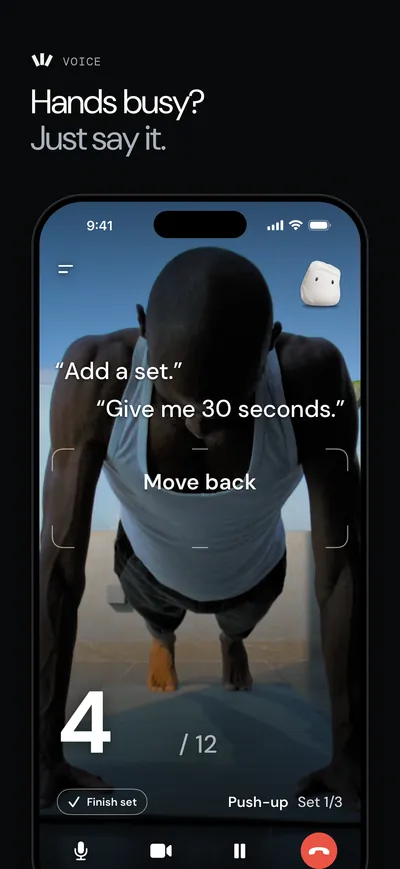
Hands busy? Just say it. A man doing push-ups on a balcony, counted on the live camera at 4 of 12, with example requests such as "Add a set" and "Give me 30 seconds".
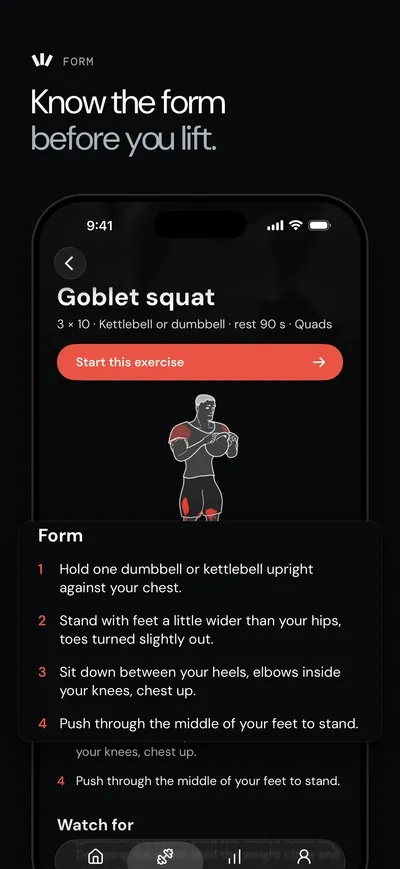
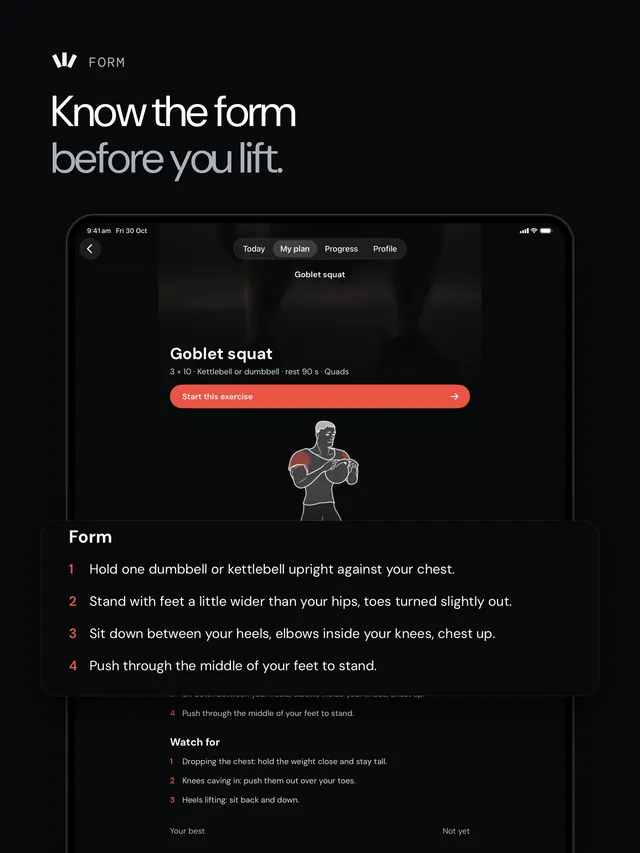
Know the form before you lift. The goblet squat page with an exercise figure and four numbered form steps.
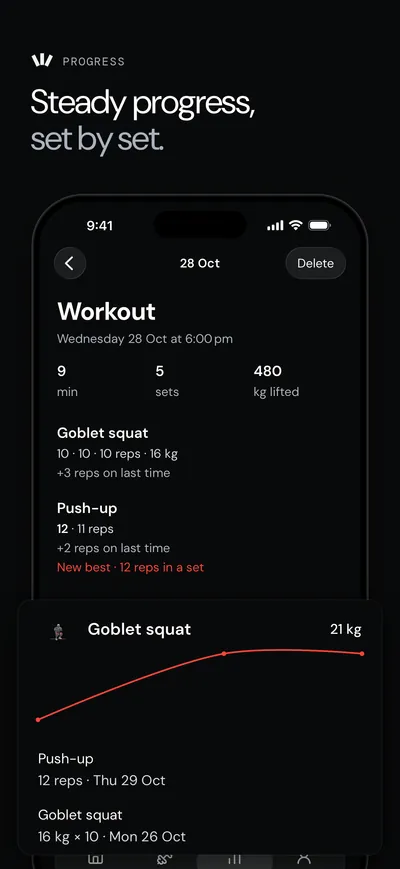
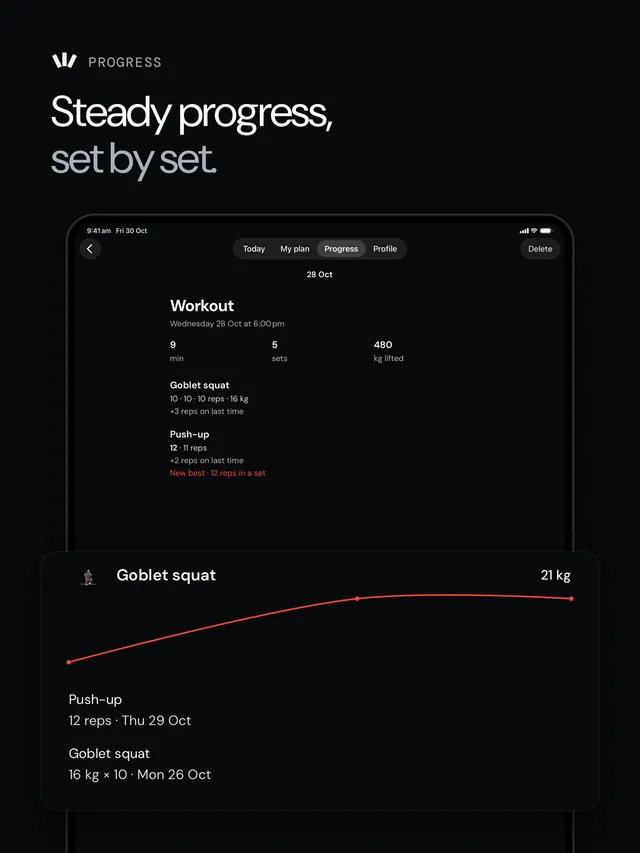
Steady progress, set by set. A workout summary with sets, reps and weight lifted, and a goblet squat chart rising to 21 kg.

Footage: Mixkit, free licence.

My part
SwiftUI app, TypeScript backend, releases
Published by
Shelgaon Ltd
Links
App Store · workoutdirector.com

Stack

iOS app

  • Swift
  • SwiftUI
  • SwiftData

Camera and voice

  • MediaPipe BlazePose
  • Vision framework
  • WebRTC

Backend on AWS

  • TypeScript
  • AWS Lambda
  • DynamoDB
  • AWS CDK

Sign-in

  • Better Auth
  • Postgres
What each one does
Swift
The app's language
SwiftUI
iPhone and iPad screens
SwiftData
Sets stored on the phone
MediaPipe BlazePose
Pose model, on the device
Vision framework
Fallback body pose
WebRTC
Live voice coach call
TypeScript
Backend language
AWS Lambda
Functions split by job
DynamoDB
App data
AWS CDK
Infrastructure as code
Better Auth
Apple, Google and email codes
Postgres
Sign-in data, on Neon

Workout Director is an iPhone and iPad training app, published on the App Store by Shelgaon Ltd. I wrote the SwiftUI app and its TypeScript backend on AWS Lambda, and I ran the TestFlight and App Store releases. It has been on the App Store since October 2026.

The problem

Training on your own, you either count reps in your head or stop to tap a phone. The idea was a phone propped up across the room that counts for you and talks you through the session, without filming you. That last part set the main constraint: the camera feed never leaves the phone. Video is never recorded, saved or uploaded.

Diagram of what stays on the iPhone (front or back camera frames, pose tracking, rep counter, workout state, local log) and what leaves it (short text state notes and, when the coach is on, your voice from the microphone to the voice coach; synced sets to the backend).On the iPhoneshort text state notesyour voice, when the coach isonsigned in: sync sets andsessionsCamera frames (front orback)Pose tracking (MediaPipe,on device)Rep counter and formchecksCount on screen, recordedcount clipsWorkout state: set, reps,restLocal log (SwiftData)Apple Health: finishedworkoutMicrophoneVoice coach (realtimeaudio)Backend API
What stays on the iPhone and what leaves it. Scroll sideways to see all of it.

Counting reps on the device

Pose tracking runs on the phone with Google MediaPipe, and a rep counter sits on top of the pose stream. It counts squats, push-ups and more from the camera. Planks and other holds are timed sets instead.

MediaPipe's pose model comes in three sizes, so I measured them before picking one. On 156 single-person photos from the COCO validation set, Lite placed 72% of joints within 5% of the person's size, Full 79% and Heavy 84%. On 14 exercise clips, Full's joints jumped half as much from frame to frame as Lite's. Heavy took about three times as long per frame as Full and added 21 MB to the app, which wasn't worth it for live use, so the app ships Full. If MediaPipe can't start, or runs below 12 frames a second, that workout switches to Apple's Vision body pose without resetting the count.

Most of the work was not counting things that aren't reps: half reps, walking, standing up and getting into position. Around the counter, the app gets the person in frame first with a short countdown and prompts such as Move back or Step into frame, and it always leaves a manual path: minus and plus are one tap away, and you can correct the count by voice.

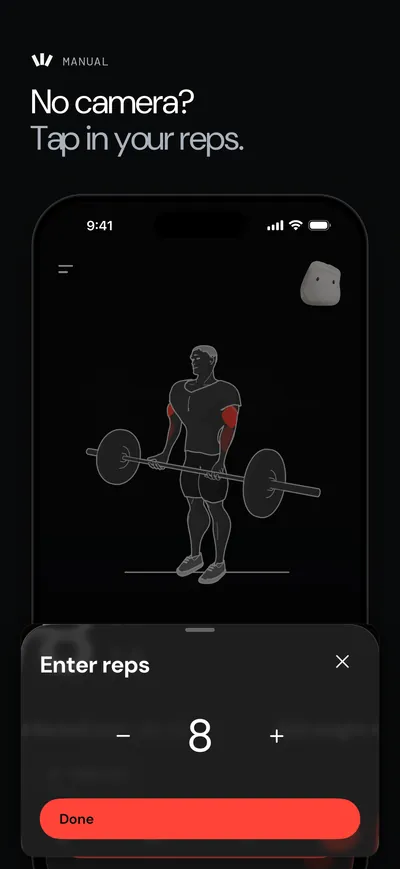
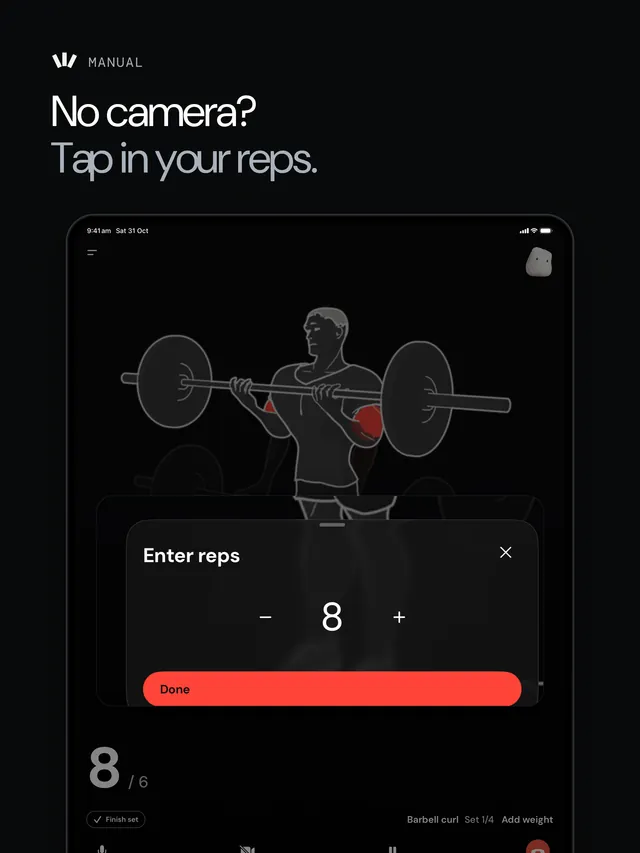
Hands busy? Just say it. A man doing push-ups on a balcony, counted on the live camera at 4 of 12, with example requests such as "Add a set" and "Give me 30 seconds".No camera? Tap in your reps. A panel for entering 8 reps with minus and plus buttons, over a barbell exercise figure.Steady progress, set by set. A workout summary with sets, reps and weight lifted, and a goblet squat chart rising to 21 kg.
The camera counting a push-up set, with examples of what you can say to the coach; typing in reps without the camera; and the workout summary afterwards. App Store screenshots. Footage: Mixkit, free licence.

A voice coach that asks before it acts

The voice coach is the only feature that needs the network during a set. The phone opens a WebRTC call to a realtime voice model. The model never sees video: it gets short text notes about the workout state over the data channel. The provider key stays inside AWS; the backend checks the user's access and limits and mints a short-lived client secret for each call, and the app falls back to on-device speech recognition and a text reply if the realtime service is unavailable.

The model doesn't change anything itself. When you say "rest for 90 seconds", it replies with a tool call, and the phone runs it against its own workout state and shows a small chip with Undo. The tools are the things you would otherwise do by hand: log a set, correct the reps, start, extend or skip a rest, swap or skip an exercise, add or remove a set, pause, and end the workout. Swapping an exercise, dropping the remaining sets or changing the rest applies at once with Undo. Adding load waits for a Confirm, and ending the workout waits for a spoken yes.

Sequence diagram of a Live Coach session: the app asks the backend for a session, the backend checks flags and limits, reads the provider key from Secrets Manager and mints a short-lived client secret, then the app talks to the realtime voice model over WebRTC, running tool calls on the phone. If the realtime service is unavailable, the app uses on-device speech recognition and a text request instead.loop[Each coach turn]alt[Realtime unavailable]POST /v1/trainer/live-coach/sessionCheck flag, access, limitsRead provider key(never leaves AWS)Mint short-lived client secretClient secret andcompact instructionsWebRTC call, pre-warmedwhen the workout openssession.update(semantic turn detection)State notes on the data channel(no video)Spoken line or a tool callRun the tool on thephone(chip with Undo)POST /v1/trainer/live-coach/usageok, or stop: true past a limitOn-device speech recognition,then a text requestText reply, spoken on the phoneUp to 4 quiet retries (0.6 s, 1.5 s, 3 s).Secret refreshed about a minute before expiryiPhone appChatFn (Lambda)Secrets ManagerRealtime voice modelTrainer endpoint(fallback)iPhone appChatFn (Lambda)Secrets ManagerRealtime voice modelTrainer endpoint(fallback)
How a Live Coach session connects, and the fallback path. Scroll sideways to see all of it.

Trainer chat

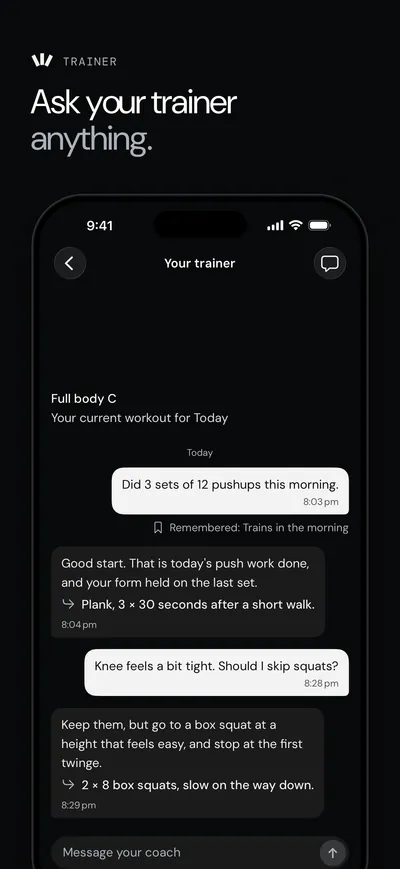
The trainer chat answers questions in text. Each message goes through the backend to a text model, with the context it needs: the person's profile, facts it has been asked to remember, the training log from the last seven days and the last 24 messages. Older messages are folded into a running summary, so the prompt stays short as a conversation grows.

The model has to reply in a fixed JSON shape: one to three messages, plus up to six things to remember or forget. Messages are rate limited and count against a per-user budget, and a message the phone sends twice, for example after a dropped connection, gets the stored reply instead of a second model call.

The backend

The backend is TypeScript on AWS Lambda behind API Gateway and CloudFront, defined with the AWS CDK. It is split into functions by job: profile, sessions and sync; the trainer and voice tokens; sign-in; operations; and subscription webhooks. App data is in DynamoDB with point-in-time recovery, and sign-in data is in Postgres on Neon.

Phones in a gym are often offline, so uploads take an idempotency key, which means a retried upload doesn't create a duplicate workout, and sync does a last-write-wins merge so the same log can follow you to another device.

System overview: the SwiftUI app calls CloudFront and API Gateway, which route to Lambda functions for the API, trainer chat, sign-in, admin and billing webhooks. They use DynamoDB and Secrets Manager; sign-in uses Neon Postgres and Resend; the trainer uses a text model and a realtime voice model; RevenueCat sends webhooks; PostHog handles errors and flags.AWSiPhone appmints short-livedvoice tokenWebRTC audiowebhookerrors, flagsflagsSwiftUI appOn-device pose trackingand rep counterCloudFrontHTTP API GatewayApiFnprofile, sessions, syncChatFntrainer, voice tokensAuthFnBetter AuthAdminFnopsBillingWebhookFnDynamoDB6 tablesSecrets ManagerNeon Postgressign-in dataResendemail codesText modeltrainer chatRealtime voice modelRevenueCatMedia CDNexercise figuresPostHog (EU)
System overview. Scroll sideways to see all of it.

Releasing safely

A wrong count is the first thing a user notices, so counting changes shipped behind switches. Camera counting had its own feature flag, internal builds had a pose debug overlay, and individual behaviours had kill switches served from a public config endpoint, so a behaviour could be turned off without waiting for App Review. New counting models ran in shadow mode first, alongside the live counter, without changing the count anyone saw.

Releases followed the same steps every time: a backend diff that stops if it would replace or delete a stateful resource, a health check after each deploy, and an app release that goes through TestFlight, a preflight checklist and a phased rollout. A minimum-version check let the backend ask old builds to update.

Flowchart of the release process. Backend: sign in, cdk diff, stop if a stateful resource would be replaced or deleted, otherwise deploy and check health. iOS app: release branch and version bump, archive, upload, wait for App Store Connect, internal TestFlight, a core-feature gate and preflight, then App Review with a phased rollout.iOS appBackend (AWS CDK)yesnoSign in to AWScdk diff --all (prod context)Replaces or deletesa stateful resource?Stopcdk deploy --allCheck /v1/healthrelease/x.y.z PR:bumpMARKETING_VERSIONRelease archive withxcodebuildplus a sanity checkExport and uploadwith xcrun altoolPoll App Store Connectuntil VALIDInternal TestFlightCore-feature gate and12-check preflightSubmit to App Review;auto-release, 7-day phasedrollout
The backend and app release steps. Scroll sideways to see all of it.
Flowchart of the forced update check: on launch the app reads the minimum version from a public config endpoint; if the app is older it shows a Time to update screen, and any API call from an old build gets a 426 response that shows the same screen.noyesApp launches orreturns to foregroundGET /v1/config (public,before sign-in)Minimum version from themin-app-versionfeature flag, cached 60 s;env var as fallbackApp older thanthe minimum?Carry on'Time to update.' screenwith App Store linkAny API call from a buildunder the minimum426 app_update_required
How old builds are asked to update. Scroll sideways to see all of it.

Screens

iPhone 7 screens

  1. Hands busy? Just say it. A man doing push-ups on a balcony, counted on the live camera at 4 of 12, with example requests such as "Add a set" and "Give me 30 seconds".
    Voice
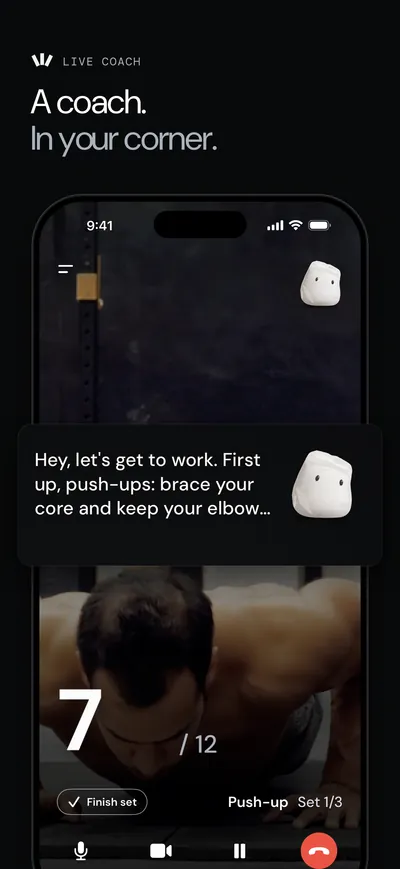
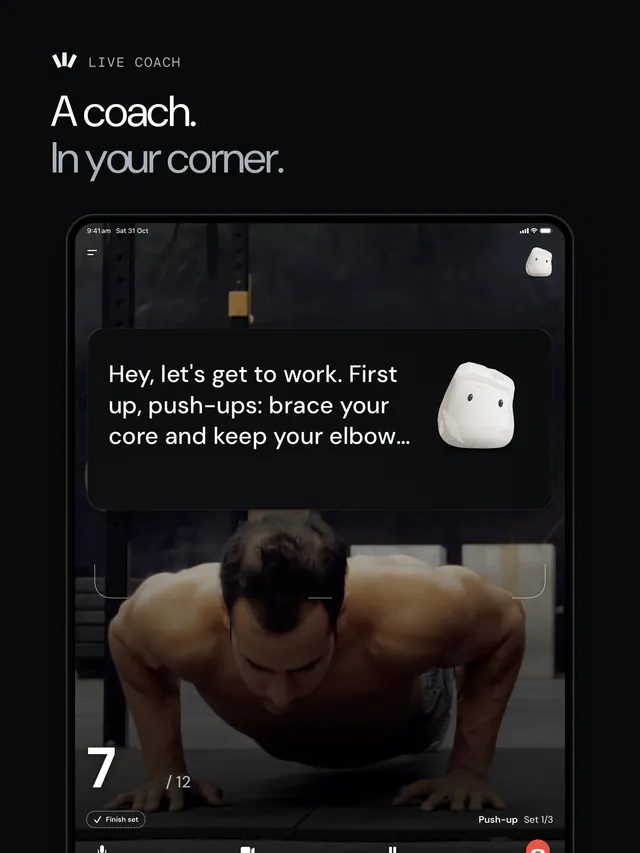
  2. A coach in your corner. A man doing push-ups on the live camera, counted at 7 of 12, while the voice coach tells him to brace his core.
    Live Coach
  3. No camera? Tap in your reps. A panel for entering 8 reps with minus and plus buttons, over a barbell exercise figure.
    Manual count
  4. Know the form before you lift. The goblet squat page with an exercise figure and four numbered form steps.
    Form
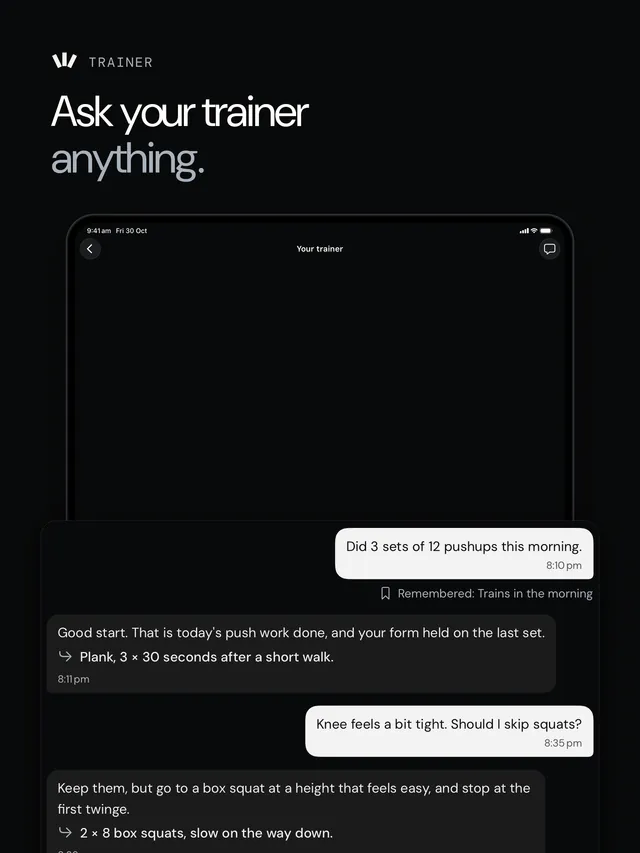
  5. Ask your trainer anything. A trainer chat that suggests box squats after a message about a tight knee.
    Trainer
  6. Steady progress, set by set. A workout summary with sets, reps and weight lifted, and a goblet squat chart rising to 21 kg.
    Progress
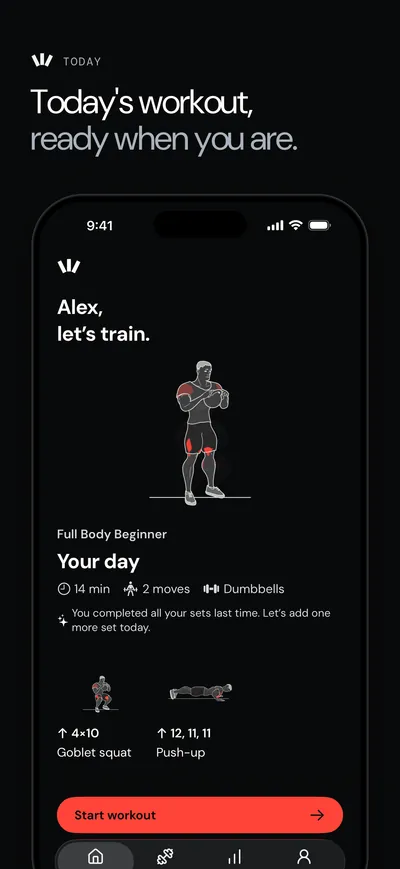
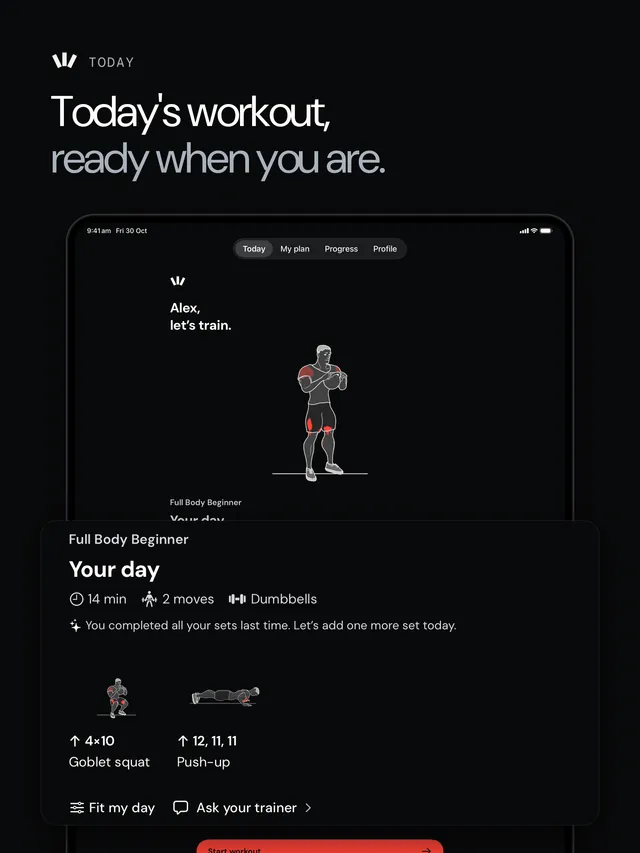
  7. Today's workout, ready when you are. A 14 minute full body plan for the day with a Start workout button.
    Today

Footage: Mixkit, free licence.

iPad 7 screens
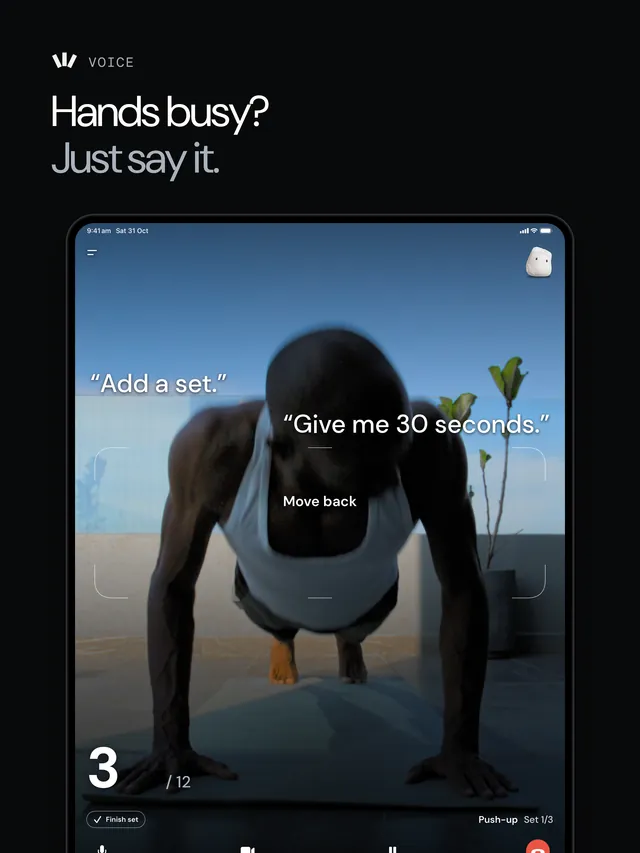
  1. Hands busy? Just say it. A man doing push-ups on a balcony, counted on the live camera at 4 of 12, with example requests such as "Add a set" and "Give me 30 seconds".
    Voice
  2. A coach in your corner. A man doing push-ups on the live camera, counted at 7 of 12, while the voice coach tells him to brace his core.
    Live Coach
  3. No camera? Tap in your reps. A panel for entering 8 reps with minus and plus buttons, over a barbell exercise figure.
    Manual count
  4. Know the form before you lift. The goblet squat page with an exercise figure and four numbered form steps.
    Form
  5. Ask your trainer anything. A trainer chat that suggests box squats after a message about a tight knee.
    Trainer
  6. Steady progress, set by set. A workout summary with sets, reps and weight lifted, and a goblet squat chart rising to 21 kg.
    Progress
  7. Today's workout, ready when you are. A 14 minute full body plan for the day with a Start workout button.
    Today

Footage: Mixkit, free licence.

Screenshots are from the App Store listing. Workout Director is published on the App Store by Shelgaon Ltd. More detail is in the notes: Counting reps without the video leaving the phone.